Cellar Keeper Launch Notes (Aug 2026)
What actually shipped when Cellar Keeper opened the cellar doors.
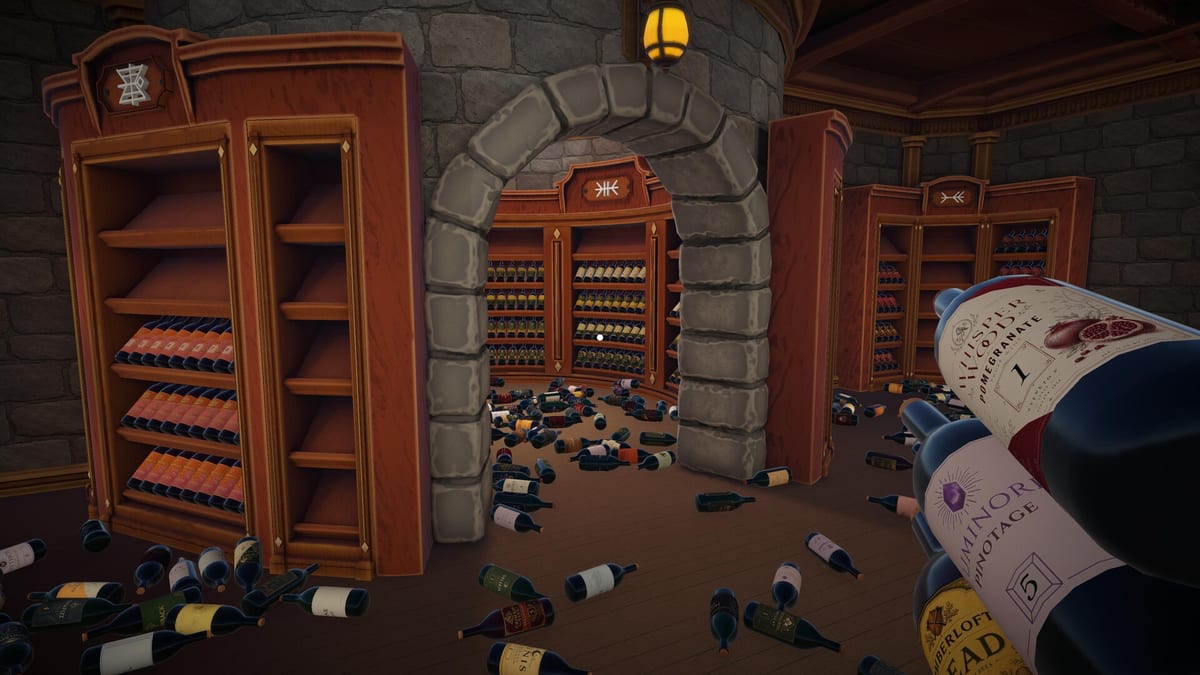
EgoTrampoline’s cozy organizing sim Cellar Keeper launched on Steam in early August 2026 after a public trailer push and a run past 20,000 wishlists. These launch notes capture the day-one feature set so you can separate marketing language from playable systems. Watch the embedded trailer for atmosphere, then use the checklist below as a buying and first-session guide.
Release window
- US: August 6, 2026
- EU & Asia: August 7, 2026
- Store: Steam app 4935510
- Genre tags: Casual, Indie, Simulation
- Players: Single-player only — no shared sessions
Introductory pricing and regional discounts may appear on Steam during the first week; confirm the live price on the store page.
Day-one features
Core loop. Sort 2,448 bottles by wine type, brand, and series number onto cabinet shelves. Correct placements flash yellow; mistakes flash gray. Carry up to ten bottles while reading the left-side carry list.
Story beat. A cursed collector — trapped as a chicken after a failed spell — waits for you to restore order. Narrative context lives in How to Free the Keeper.
Modes.
| Mode | Launch behaviour |
|---|---|
| Cozy Mode | Skill points from shelves; seven upgrades |
| Speedrun Mode | No upgrades; leaderboards |
| Hardcore Mode | Breakage risk when bottles are mishandled |
Skills (Cozy). Spot Matches, Batch Grab, Quick Order, Target Hint, Auto Place, Sprint, and Jump — each upgradeable five times. Priority advice sits in How to Prioritize Skills and the Skills Tier List.
Achievements. Ten Steam trophies — rack milestones from First Rack through Keeper of the Cellar (400 racks), Perfect Order for full restoration, Peak Efficiency for all skills, Juggling Act for ten-bottle carries, and No Shortcuts for Speedrun Mode only. See Achievements — not Master Organizer for Speedrun.
Input. Steam lists Full Controller Support alongside keyboard and mouse. Binding notes live under Controls.
Quality-of-life flags on Steam. Camera Comfort, custom volume, playable at your own pace, save anytime, Steam Cloud, and leaderboards.
Steam store features at launch
Beyond the sorting loop, the Steam listing advertises several comfort and persistence options worth noting before you buy. Save anytime means you can pause mid-shelf without losing carry progress — useful when learning Hardcore rules. Steam Cloud syncs saves across PCs logged into the same account, though you should still wait for sync icons to settle after crashes (see Troubleshooting). Leaderboards attach to Speedrun Mode, giving competitive keepers a reason to replay even after the story resolves.
Camera Comfort and custom volume sliders matter for long Cozy sessions where you will stare at label text for hours. None of these replace skill upgrades — they simply make the marathon tolerable on varied hardware.
Technical baseline
Minimum and recommended PC specs are summarised on System Requirements. If Windows Defender or Steam fails to launch the client, jump to Troubleshooting before refunding.
EgoTrampoline targets 64-bit Windows 10 or 11 with roughly 1 GB of install space. The game is not a shader-heavy blockbuster, but first-person movement through dense bottle stacks still benefits from a discrete GPU at or above the GTX 960 class listed on Steam.
What launch notes intentionally omit
EgoTrampoline has not published a full wine-brand encyclopedia or a public achievement API dump. Bottle brand names are fictional (AI-assisted brand design is disclosed on the Steam page). Treat community wine pronunciation guides as helpful, not canonical.
The launch build also does not include a second cellar map. EgoTrampoline teased future cellars in a July 2026 news post — details on Roadmap — but day-one buyers get one complete 2,448-bottle campaign.
First-week player advice
- Start in Cozy Mode — read Getting Started.
- Finish small shelves first for skill points.
- Learn map symbols via Cabinet Symbols.
- Keep a clean save before experimenting with Hardcore.
- Leave Speedrun and Master Organizer for after map literacy.
- Use Find Misplaced Bottles when gray flashes persist on seemingly correct labels.
Day-one checklist for content creators
If you stream or record Cellar Keeper at launch, disclose that brand names are fictional, show the map legend on camera, and avoid promising second-cellar DLC dates. Link viewers to Roadmap for teased ideas and to Troubleshooting if chat reports Defender false positives.
Relationship to the rest of this wiki
Launch notes freeze a moment in time. When patches land, we will append a dated section rather than silently rewriting history. Until then, treat this page as the authoritative “what shipped in August 2026” snapshot for the Cellar Keeper wiki.
Related updates
- Updates Hub — news index
- Roadmap — post-launch ideas
- Review — whether the loop fits you
Cellar Keeper’s launch build is complete enough to finish the cellar end-to-end. Future cellars are aspirations, not day-one DLC.
Frequently Asked Questions
Quick answers to the most common questions.
Is Cellar Keeper multiplayer at launch?
No. The Steam page lists single-player only. Sorting sessions are solo.
Does the launch build include Hardcore Mode?
Yes. Hardcore Mode is available at launch with bottle breakage. Further Hardcore ideas appear on the [Roadmap](/updates/roadmap/).
How many achievements shipped on day one?
Ten Steam achievements, including First Rack through Master Organizer.
Where do I report launch bugs?
Use the pinned Bug Reports thread on the Steam Community hub for app 4935510, and cross-check tips on [Troubleshooting](/guides/troubleshooting/).